How it works

Perfect product images,
in three steps

Upload your product photos and get back perfectly sized, optimised images ready for Shopify, Lazada, Shopee, or any online store — in seconds.

1
Upload
your images
2
Choose your
settings
3
Download
& publish

How it works

Your product always fills
the canvas edge-to-edge

PixelPrep has two modes. Choose the one that fits your workflow.

White or transparent background
resize & fit

For product photos that already have a white or transparent background. Your product is centred and scaled to fill the canvas — no cropping, just clean, consistent sizing. Instant download.
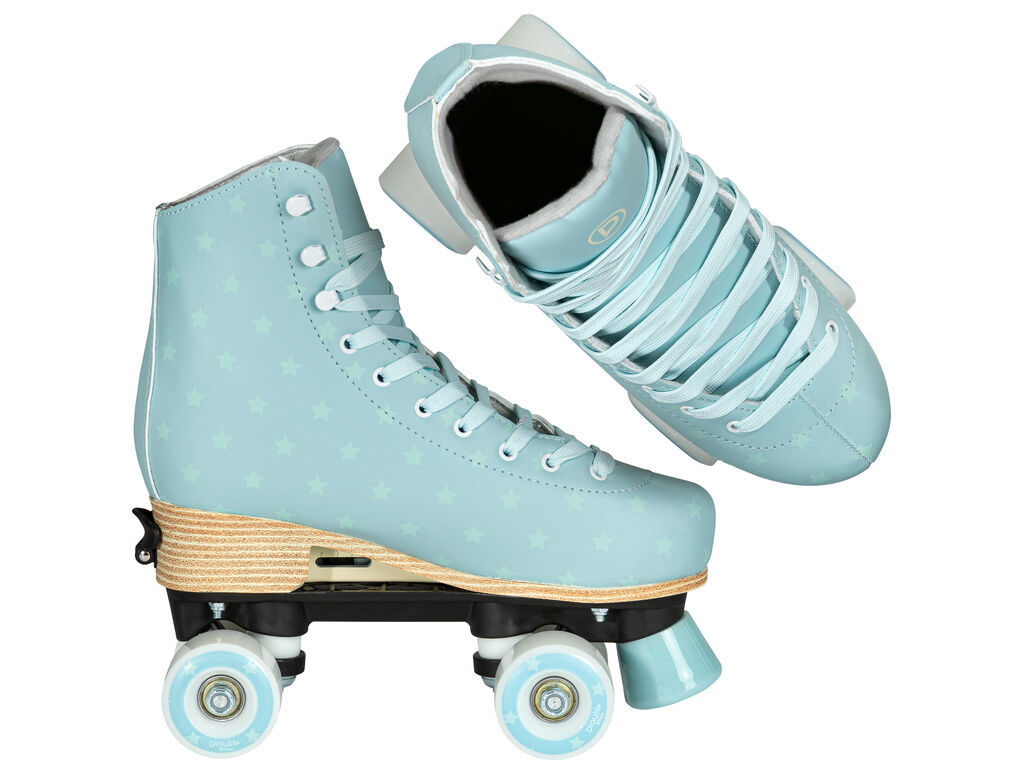
Original product image
Before — Original 1024×768, white background
Resized product image
After — 800×800, centred, white fills remaining space
The rule: Portrait images (taller than wide) fill top & bottom edges first. Landscape images (wider than tall) fill left & right edges first. Either way, your product touches at least two edges — it never floats in the middle. White fills the remaining space.
⚠️ Important: This mode works best with white or transparent backgrounds. If your product photo has a coloured background (e.g. grey studio backdrop), the colour will be treated as part of the image — it won't be removed. Use the Remove Background mode instead for non-white backgrounds.

AI background removal
any colour, instantly

Powered by BiRefNet AI. Remove any background and place your product on your chosen colour. Results are emailed to you as a zip file — you can close the page while we process. Requires a free account.

Original product image
Before — Original photo, any background
Background removed
After — 800×800, background removed, Navy
White background
White
Navy background
Navy
Terracotta background
Terracotta
Forest background
Forest
📧 How it works: Toggle "Remove background" on → choose your background colour → upload images → tap Process. Your images are processed on our server with BiRefNet AI and emailed to your account email as a zip file. You can close the page — no need to wait.

Image fill control

Control how much your product
fills the canvas

Use the fill % slider to add more or less padding around your product. 100% fills edge-to-edge. 70% gives a clean, airy look with natural breathing room.

100% fill
100%
85% fill
85%
70% fill
70%
50% fill
50%

All features

Everything you need,
nothing you don't

Built specifically for e-commerce product photography. Every feature solves a real problem that Shopify and marketplace sellers face every day.

📐
Smart canvas resize
Fills top & bottom or sides — whichever doesn't crop your product. Supports 800×800, 1000×1000, 1200×1200, 1500×1500, or any custom size.
Never crops
🤖
AI background removal
BiRefNet model — state of the art open-source AI. Handles complex edges, interior gaps, and detailed product shots.
BiRefNet AI
🎨
24 colour presets + custom
Neutrals, warm tones, blues, greens, and bold colours. Plus a full colour picker and hex input for exact brand colours.
Any colour
Optimised JPEG output
Every image is saved with quality 85, 4:4:4 chroma subsampling (preserves colour sharpness), Huffman-optimised encoding, and progressive rendering for fast perceived load.
Smallest file size
🗑️
EXIF metadata stripped
Camera model, GPS location, date taken, and all other hidden metadata removed. Smaller files and better privacy — your customers' browsers don't need to know what camera you used.
Privacy + speed
📦
Batch processing
Upload multiple images at once. All processed with the same settings. Single images download as JPEG, batches download as a ZIP file ready to upload.
Multiple images
🔒
Privacy first
Your images are processed in memory on our server and immediately discarded after download. We never store, retain, or use your product images for any purpose.
Not stored
📏
Fill % slider
Control how much of the canvas your product occupies — from edge-to-edge at 100% to a centred product with generous padding at 50%.
Padding control
🌐
Works on any platform
Output images meet the requirements for Shopify, Lazada, Shopee, Qoo10, Carousell, Amazon, and any other marketplace that requires square product images.
All marketplaces

Why file size matters

Smaller images =
faster store = more sales

Page speed directly affects conversion rates. A 1-second delay in page load time can reduce conversions by up to 7%. PixelPrep produces the smallest possible JPEG at the best visual quality — so your product pages load fast on every connection.

4:4:4
Full chroma subsampling
Preserves colour detail at every pixel. Most tools use 4:2:0 which halves colour resolution and makes product edges look muddy.
Q85
Optimal quality setting
Quality 85 is the sweet spot — visually indistinguishable from Q95 but 30–40% smaller file size. Beyond Q85, you pay in bytes without visible benefit.
Progressive
Renders top-to-bottom
Progressive JPEGs render a low-res preview immediately, then sharpen as they load. Products appear instantly on slow connections instead of loading line by line.

Comparison

How we compare to
other tools

We're not the only image tool out there — but we're the only one that combines all of this at SGD 1.99/month.

Other tools
Crop the image to fit the canvas
Letterbox with large empty borders
Charge $0.02–$0.10 per image
Keep EXIF data (larger, slower files)
Use 4:2:0 subsampling (blurry colours)
Limited background colours
No fill % control
PixelPrep
Always fills canvas edge-to-edge
Aspect ratio preserved — never distorted
SGD 1.99/month unlimited — no per-image fees
EXIF stripped — smallest possible file
4:4:4 subsampling — crisp colour edges
24 presets + custom colour picker
Fill % slider for precise padding control

Ready to prep your
product images?

20 free images — no credit card needed. Then SGD 1.99/month unlimited.

Start for free
Cancel anytime · No contract · Processed & discarded immediately